TLDR; Need the fast version? Use an AI SEO checker to build a repeatable workflow, not just a list of errors.
Pick the right tool, connect Search Console and GA4, set crawl rules, then let AI group issues by impact. Fix indexing, crawl, internal linking, schema, and UX first. Use AI to flag thin pages and intent mismatches, but keep human review for accuracy, originality, and brand voice. Turn findings into a prioritized fix queue, review progress, and rerun scans to confirm gains in visibility and performance.
If you want faster audits, clearer priorities, and less guesswork, this guide is for you. It explains how to use an SEO checker with AI to review pages, spot problems, and turn raw alerts into a practical action list. Pretty useful, honestly. It works well for digital marketers, SEO pros, content teams, and agencies that want more from Automated SEO without giving up human judgment, which still matters a lot here.
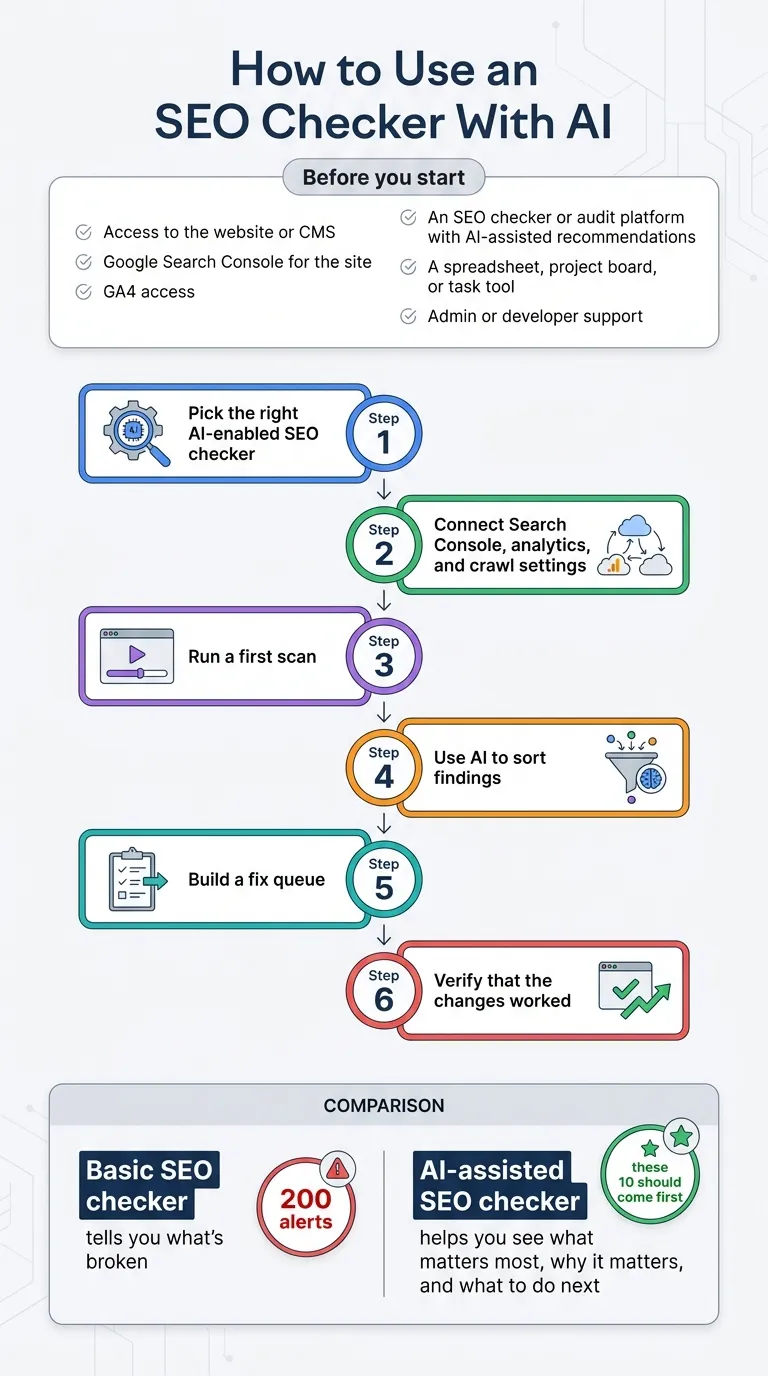
The main shift is pretty simple. A basic SEO checker tells you what’s broken. An AI-assisted SEO checker goes further by helping you see what matters most, why it matters, and what to do next. That’s the real difference. It can save hours when someone is managing a growing site, a large content library, or lots of client accounts. It also helps avoid a common mistake: spending too much time on a pile of low-impact issues while the real blockers, often crawl problems or key page gaps, stay untouched. That’s usually where time gets lost, and it happens a lot.
In this tutorial, you’ll set up your checker and connect data sources. Then you’ll run a first scan, use AI to sort findings, review content and technical issues, build a fix queue, and verify that the changes worked. It’s laid out step by step so it’s easier to follow. You’ll also see where AI helps most and where human review is still needed. That way, it shows how this fits into a repeatable Automated SEO workflow: scan regularly, sort issues by likely impact, and check whether fixes actually improved the pages.
Before you start
Before using an AI-supported SEO checker, it helps to have a few basics in place:
- Access to the website or CMS
- Google Search Console for the site
- GA4 access if traffic and engagement context is useful
- An SEO checker or audit platform with AI-assisted recommendations
- A spreadsheet, project board, or task tool to keep track of fixes
- Admin or developer support for technical changes like redirects, canonicals, robots rules, or schema
Tip: It’s often easier to start with just one section of the site. A blog, product pages, or service pages are usually good places to begin. That first pass will probably feel easier to manage, and it can help you avoid feeling overwhelmed early on.
Step 1: Pick the right AI-enabled SEO checker
Choose a tool that does more than spit out a huge list of errors. The better SEO checkers bring crawl data, on-page analysis, AI-assisted prioritization, and reporting together in one place in a way people can actually use. In my view, the most helpful tools take you from “here are 200 alerts” to “these 10 should come first,” which is a lot more practical. That shorter path often matters because teams usually get faster wins from technical audits and reporting before they move on to automate more complex work.
Look for these features:
- Full-site crawling
- Search Console and GA4 integrations
- Issue prioritization by impact
- Content quality checks for thin, duplicate, or mismatched pages
- Exportable reports for teams or clients
- Recurring scans for Automated SEO monitoring
AI adoption is already mainstream, so SEO teams are now expected to use software that cuts down manual review instead of adding more dashboards. And honestly, that’s often the real problem.
If you’re comparing tool types, understanding the tradeoff between an all-in-one platform and native search data really helps. We covered that in Automated SEO platforms versus Google’s own tools.
You can also compare newer approaches in Website SEO Checker and AI Mode in 2026, especially if your team is reviewing AI-assisted workflows.
Common mistake: Choosing a tool just because “AI” is in the headline. If it can’t connect crawl findings to pages that actually get search traffic, it will probably still create noise.
Step 2: Connect Search Console, analytics, and SEO checker crawl settings
Now connect the data sources. This is usually the point where an AI-assisted SEO checker starts to feel really useful, not just generic. On most platforms, Google Search Console connects first, then GA4. After that, set up the crawl, since that’s often the basic order.
Use these settings as your starting setup:
Search Console
- Connect the property version that matches your site
- Import queries, clicks, impressions, CTR, average position, and maybe related metrics
- Pull at least the last 90 days of data for a better baseline; that usually helps and is a good start
GA4
- Bring in sessions, engagement rate, and conversions when available
- Map key page groups like blog, product, collection, or location pages so they’re often quicker to find
Crawl settings
- Crawl the full live domain
- Respect canonical tags, and flag canonical conflicts too
- Include JavaScript rendering when your site relies on client-side content
- Set a crawl speed your server can handle
- Exclude staging URLs, plus internal search results if they create noise
This usually gives the checker the best context for scoring issues, which matters and is often worth the extra minute.
Tip: If your checker supports segments, create one just for high-value pages. That way AI can focus on problems on pages already bringing in clicks or revenue, like key landing pages or product pages. That’s often more useful, especially when time is short.
Troubleshooting: Are page counts looking too low? Check robots rules, noindex tags, login walls, and JavaScript rendering settings. In most cases, one of those is likely blocking pages you expected to see. It often helps to start with the obvious issues first, since that usually saves time.
Step 3: Run your first SEO checker scan and let AI cluster the findings
Start the scan, and once it finishes, don’t jump on every warning right away. A good first step is to let the AI layer group findings into buckets like crawlability, indexing, page experience, content quality, metadata, internal linking, and schema. That first pass usually makes the rest much easier to sort out.
This is where AI is especially useful. Traditional audits often stop at finding issues, but AI-driven audits can also spot patterns across pages, flag repeated weak structures, and point out when a pile of small errors likely comes from one root cause. In practice, that can save a lot of time. For example, if dozens of articles show low word count, duplicate H1s, and no internal links, the bigger issue may be a template or workflow problem rather than 50 separate page fixes.
A simple scoring method is enough here; there’s no need to make it too complicated:
- Business impact: Does this affect money pages or high-traffic pages?
- SEO impact: Can it hurt crawlability, indexing, relevance, or trust?
- Ease of fix: Can your team solve it quickly, or will it take more work?
Your AI cluster should separate cosmetic issues from real blockers, so attention goes first to what actually affects performance.
Common mistake: treating every alert as if it has the same weight. Usually, it doesn’t. A missing alt tag on one image is very different from a noindex tag on key service pages. That difference often matters much more in the real world.
Step 4: Review the technical SEO checker issues with the biggest impact first
After clustering, focus on technical problems that can reduce visibility across many pages. Your SEO checker should usually help sort them by page count, traffic impact, and overall reach, since that’s often the fastest way to see what matters most.
Start with this order:
1. Indexing blockers
Indexing issues are often the real problem: noindex, blocked robots paths, redirect loops, broken canonicals, and server errors. If important pages can’t be indexed, fix that first. Start there.
2. Crawl waste
Look for faceted URLs, duplicate parameter pages, thin tag pages, or orphan pages. AI can often group them by pattern, which usually helps, so you don’t need to check each one by hand. In most cases, that’s easier.
3. Internal linking gaps
Find pages with strong impressions but weak internal links, since that can be a quick win. Then add links from related, trusted pages, often top guides or hub pages. Use clear anchor text, so it’s obvious where the link goes.
4. Structured data problems
Look for missing or broken schema on pages where it matters most, like product, article, FAQ, or local business pages.
5. Speed and UX issues
Slow templates, heavy images, layout shifts, and script bloat are usually the main trouble spots.
Use that as a filter, not a distraction. The short version: fix template-level problems before you spend time polishing individual pages, especially when the same pattern keeps showing up across the site, which honestly happens pretty often.
If a problem shows up across hundreds of URLs, the real cause is often in the theme, plugin, template, or CMS field behind it.
For a deeper audit workflow, this guide on how to run an automated SEO audit that finds issues will probably help.
Teams handling larger sites may also benefit from Enterprise SEO Automation for Large Content Teams, especially when recurring audits become harder to manage manually.
Step 5: Use AI to check content quality and search intent fit
Once the technical blockers are clear, the next step is content. This is where a lot of teams lean on automation a bit too much, and it happens all the time. AI is very good at spotting patterns like thin pages, repeated intros, title mismatches, weak entity coverage, and missing subtopics. But human review still matters when judging accuracy, originality, and brand voice. That’s still the part AI usually can’t do reliably on its own.
Review these signals page by page:
- Title tag and H1 should match the main search intent
- The intro should answer the query quickly
- Headers need to cover the right subtopics
- Internal links should support the reader’s next step
- Content should feel different from similar pages on your site
- Important claims should be clear and backed by trustworthy sources
AI can help compare a page against top-ranking patterns, but it shouldn’t push every page into the same generic structure, which often happens if you let it go too far. In most cases, the goal is to spot patterns, not make copies.
One useful workflow is to ask the AI checker for only two outputs: missing topics and likely intent mismatch, while handling duplication risk as a separate check. After that, review the page yourself. That keeps the process fast, practical, and usually helps avoid unnecessary rewrites.
If your team is also experimenting with generated copy, AI SEO Content Generator: Best Uses and Limits explains where automation tends to help and where manual review still matters most.
Common mistake: Rewriting a strong page just because a tool suggests a better content score. If the page already ranks, converts, and satisfies users, protect what’s already working. Often, that’s the better call even if the score isn’t perfect.
Step 6: Turn findings into an Automated SEO fix queue
An audit usually only helps if it leads to action. Export the findings and turn them into a fix queue your team can actually use, without anything fancy. This is where Automated SEO starts becoming a system your team keeps using instead of just a one-time report. In most cases, the work is simple: the team reviews issues, assigns them, and fixes them on a schedule.
Set up four columns in your task board:
- Issue
- Affected URLs or template
- Priority level
- Owner and due date
Then sort each item into these buckets, which usually keeps things clearer:
Quick wins
Low effort, high value: things like broken internal links are usually easy fixes. You’ll probably also spot missing meta titles on key pages and wrong canonicals on some URLs.
Template fixes
Big changes that affect many pages: schema template repairs, heading structure bug fixes, and image compression rules, the practical stuff. Short version, I think.
Content refreshes
Pages with traffic potential, but they’re likely a weak fit for your users’ intent. The examples are old too, and subtopics are often missing.
Monitoring only
Low-risk warnings that don’t need immediate work.
For lean teams, this usually helps separate being busy from being effective, which is often harder than it sounds. The issues are small, but they still matter. SEO Bot Software often says this clearly: automation should free up time for strategy instead of creating extra cleanup work or more loose ends. And for a broader operations view, SEO workflow automation for lean content teams covers that.
You can also review Best SEO Optimization Tools for AI Search Visibility when comparing platforms that combine monitoring, automation, and reporting.
Tip: A weekly queue review is helpful. But recurring scans usually only help when someone actually owns the fixes.
Frequently Asked Questions
What is the difference between a basic SEO checker and an AI SEO checker?
A basic SEO checker mainly finds errors and reports them. An AI SEO checker, though, groups issues, estimates impact, and shows what to fix first. That helps teams work faster, especially when handling large sites.
Can Automated SEO replace manual SEO work?
No. Automated SEO works best for crawling, alerts, and faster reports. But people still need to review strategy, search intent, brand voice, and final decisions. Human judgment still matters.
How often should you run an SEO checker?
For active sites, run a full crawl at least once a month, then do smaller checks every week. On many client sites, more frequent automated scans make sense if they post often or manage ecommerce pages.
What should you fix first after an AI audit?
Start with issues that affect indexing, crawlability, and key pages. After that, fix template-level problems and internal linking gaps. Leave content updates for later. Don’t begin with cosmetic warnings.
Which teams benefit most from AI-assisted SEO checking?
Agencies, in-house marketers, publishers, and ecommerce teams get the most value because they manage many pages and handle repeated tasks. SEO Bot Software is a helpful resource hub for teams comparing AI-powered SEO automation tools, workflows, and related options.
How do you choose a good SEO checker for WordPress sites?
Choose one that crawls templates well, connects to Search Console, and helps you find issues across posts, pages, categories, plugins, and similar areas. Keep setup simple.
If you’re researching options or AI-focused workflows, SEO Bot Software can help compare tools and use cases without making the process feel like a sales pitch.
Put this into practice
Using an SEO checker with AI isn’t about replacing SEO judgment. It helps teams get to the right actions faster, which is often the hardest part. One useful approach is to choose a checker that connects crawl data with performance data first. From there, set up the crawl properly, let AI group the findings, and put the biggest visibility issues at the top of the list. After that, review content quality with a human eye, build a fix queue, and rerun the scan to confirm progress, since that’s often where real improvement starts to show.
A simple success test is whether the important pages are crawlable and indexable, have strong internal support from other relevant pages, match search intent, and stay easy to update over time. If the audit process leads to those results, the workflow is doing its job. That’s a practical way to judge whether the process is working.
What should happen next? Start with one section of the site this week. Run the scan, then fix one technical blocker, one internal linking gap, and one content issue. After the next crawl cycle, compare Search Console impressions, clicks, and index coverage. Small improvements, repeated over time, are what usually make Automated SEO worth it.
If you want more practical reviews and comparisons, SEO Bot Software is a helpful place to keep exploring AI-driven SEO workflows and tool choices. You can also use their WordPress-based resource hub for AI SEO automation insights as a starting point when refining the stack.