TLDR; Need the fast answer on SEO tools? Start with Google Search Console, Analytics, PageSpeed Insights, and Trends for first-party data—but don’t expect them to run your workflow.
For real execution, add an automated platform. Semrush comes out on top overall, Ahrefs wins for backlinks and deep research, Surfer SEO is best for content optimization, and Alli AI stands out for large-scale implementation. Serious teams use Google’s tools as the base layer, then pick the platform that fixes their biggest bottleneck.
If you’re choosing between an automated SEO platform and plain Google SEO tools, the bigger question is pretty simple: do you need raw data, or a system that helps you put that data to work faster?
Google gives marketers some really useful free tools. Search Console, Google Analytics, PageSpeed Insights, and Google Trends can show a lot. Helpful, yes. But they generally stop at signals, reports, and issues, and they don’t always help teams turn that information into a real process for audits, keyword planning, content updates, change tracking, and implementation.
After reviewing the leading options, four tools stand out for different jobs: Semrush, Ahrefs, Surfer SEO, and Alli AI. Each covers a different part of the SEO workload. None is right for every team.
SEO has become as much a workflow problem as a ranking problem, and teams are juggling audits, content, entities, technical fixes, and AI search visibility all at once. Manual work builds up fast. Reducing busywork helps teams make better decisions.
What we’re comparing
- Semrush
- Ahrefs
- Surfer SEO
- Alli AI
Google SEO tools vs automated SEO platforms: the real difference
Google SEO tools are best for first-party visibility data. Search Console shows queries, clicks, indexing issues, and page performance, while Google Analytics shows how people behave on the site. PageSpeed Insights adds speed and Core Web Vitals diagnostics. Google Trends shows wider interest patterns.
Useful? Absolutely. Fully complete? Not really.
An automated SEO platform pulls several jobs into one place: technical audits, keyword grouping, competitor analysis, content workflows, tracking, reporting, and sometimes deployment. That matters. Many teams aren’t missing data. They’re dealing with too many tabs, too many exports, and too many steps between spotting a problem and actually fixing it.
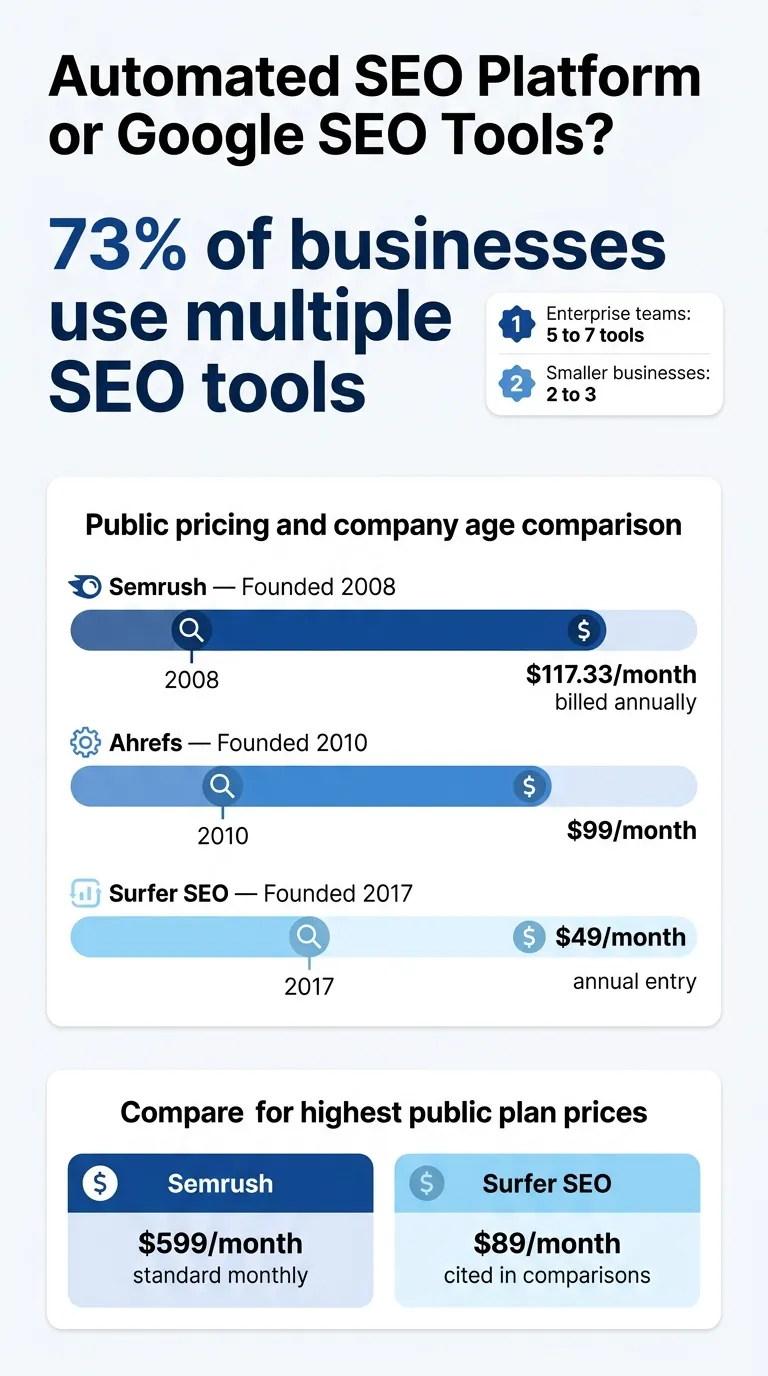
Research from Ahrefs, cited by Indexed, found that 73% of businesses use multiple SEO tools. Enterprise teams often rely on 5 to 7 tools. Smaller businesses may use 2 to 3. That matches what many marketers already feel. Google’s own stack is strong, but most teams still need another layer that helps turn insights into action.
One simple way to think about it:
Top automated SEO platform options to compare
Semrush
At a Glance
Semrush is the widest-ranging option in this group. Since launching in 2008, it has grown into a full SEO and digital marketing suite for teams that want many functions under one login. It covers keyword research, technical audits, backlink analysis, rank tracking, competitor research, and content support, all in one place. For teams asking whether an automated SEO platform can replace a patchwork of Google SEO tools plus a few extra platforms, Semrush is one of the clearest yeses. The tradeoff is extra complexity and a higher price tag.
Core Features
Who It’s For
Semrush fits agencies, in-house SEO teams, and marketers who want one main system for research, audits, tracking, and reporting. It makes the most sense when SEO is a serious part of weekly operations rather than a side task. Not for casual use.
Unique Value Proposition
Semrush stands out by pulling several SEO jobs into one workflow. Instead of bouncing between Google tools for diagnostics, one tool for backlinks, another for keywords, and another for content, teams can keep the work in one central system. That can save real time, especially when priorities change fast.
Teams comparing platforms may also want to review Top Automated SEO Tools of 2026: Revolutionizing Digital Marketing for a broader market view.
Pricing: Public pricing on its SEO + AI Search plans was listed at $117.33/month to $455.67/month billed annually, or $199/month to $599/month on standard monthly pricing.
Website: https://www.semrush.com/
Ahrefs
At a Glance
When backlink intelligence and deep SEO research matter, Ahrefs is one of the first tools marketers mention. Founded in 2010, the platform is known for strong link data, keyword research, rank tracking, and site auditing. That reputation has lasted. Compared with Google SEO tools, Ahrefs gives users much stronger competitive context. Compared with broader automation platforms, it leans more toward research than workflow execution. It stands out for teams that need to understand why competitors rank so well and where the next real opportunities are.
Core Features
Who It’s For
Ahrefs fits SEO professionals, publishers, and agencies that care most about backlinks, keyword depth, and competitor intelligence. For teams that already have a working process and mainly need better data, it can deliver a lot of value. It works best when research drives decisions more than built-in execution tools.
Unique Value Proposition
Ahrefs stands out for research depth. It helps teams see the link profile, keyword footprint, and content gaps behind ranking performance in a way Google’s free tools simply don’t match. The platform puts less emphasis on implementation automation. Instead, it focuses on giving smart teams better information they can put to work.
For more workflow-focused recommendations, the guide on SEO Strategy Tools That Turn Plans Into Action is also useful.
Pricing: Public comparison sources commonly cite plans starting from $99/month; exact current pricing should be confirmed on Ahrefs’ pricing page before purchase.
Website: https://ahrefs.com
Surfer SEO
At a Glance
Founded in 2017, Surfer SEO is built around content optimization. It doesn’t aim to be a full SEO platform like Semrush. Instead, it helps writers, editors, and content teams create pages that better match search intent and line up more closely with SERP patterns. Compared with Google SEO tools, Surfer gives much more hands-on help while content is being written. Compared with Ahrefs, it puts less emphasis on backlinks and doesn’t go as deep into wider technical SEO.
Core Features
Who It’s For
Surfer SEO works well for content marketers, editors, freelance writers, and teams producing search-led articles at scale. It’s especially useful when the main bottleneck is content quality, refreshing older pages, or turning keyword targets into stronger, easier-to-use briefs.
Unique Value Proposition
Surfer stands out by staying close to the writing process. Google SEO tools can show when a page is underperforming, but they don’t offer much help with reshaping that page once the issue is clear. Surfer fills that gap. It adds guidance directly into writing and revision workflows, which makes it more useful for teams focused on publishing, improving, and maintaining content.
Content-focused teams may also find value in Essential SEO Writing Tools for 2026: Boost Your Content when building editorial workflows.
Pricing: Public sources cite pricing from $49/month on some annual plans and $89/month in other comparisons; check Surfer’s official pricing page for the latest plan details.
Website: https://surferseo.com/
Alli AI
At a Glance
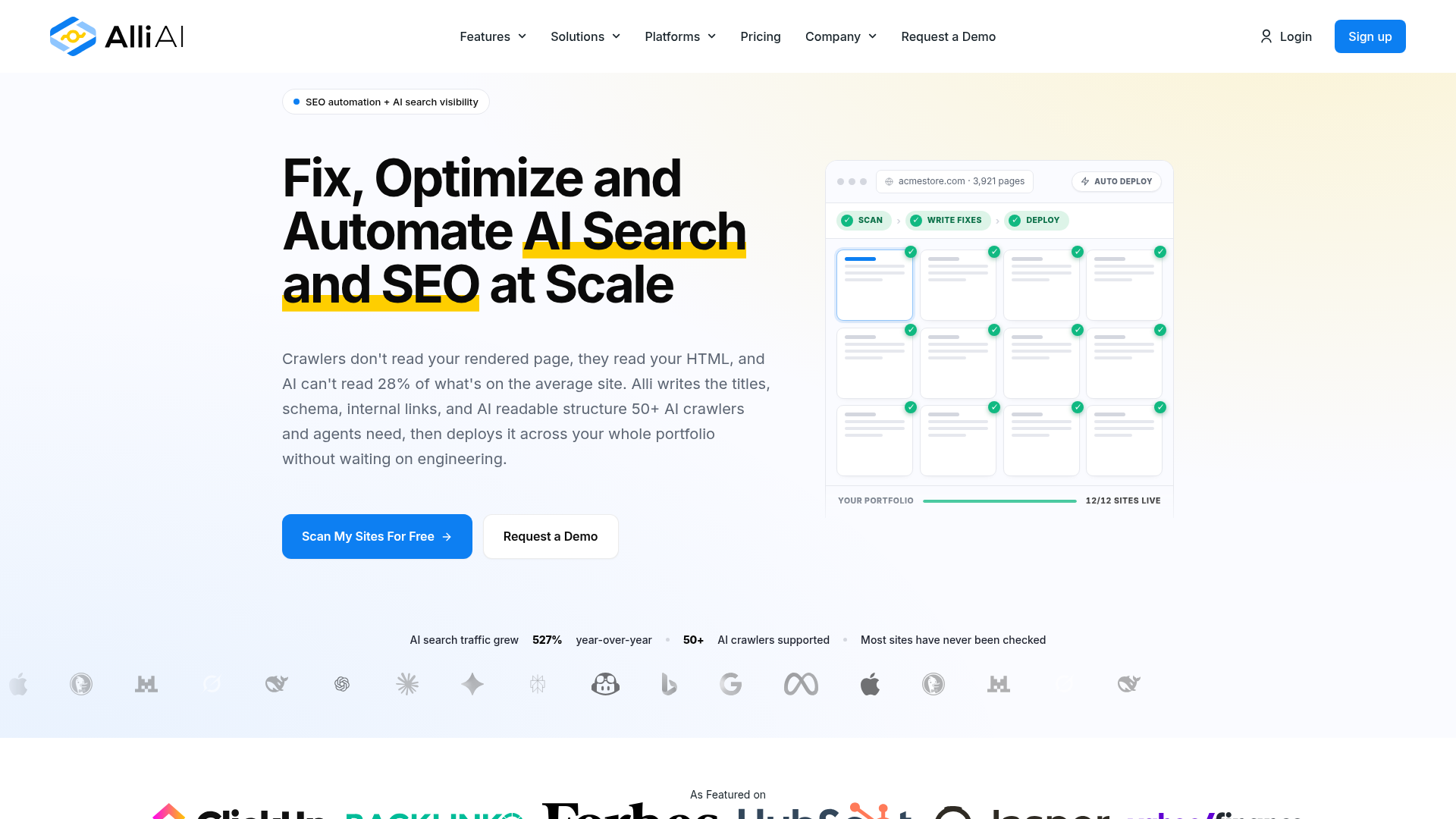
Alli AI leans more toward automation than the other tools in this list. Instead of depending mostly on research or content scoring, it focuses on making and rolling out SEO changes at scale. That gives it a different place among Google SEO tools. If Search Console surfaces issues but a team has trouble pushing fixes across a large set of pages, Alli AI becomes useful fast. It’s less known than Semrush or Ahrefs, but that hands-on automation focus is exactly why it deserves a closer look.
Core Features
Who It’s For
Alli AI works well for agencies, larger websites, and teams that already know what they want to change and then need help getting those changes live faster. It’s especially useful when implementation speed is the bottleneck, not analysis alone.
Unique Value Proposition
Alli AI stands out by focusing on deployment instead of just diagnosis. A lot of SEO tools do a solid job of spotting issues. Far fewer help teams apply repeated changes across a site without piling up manual edits. That makes Alli AI one of the more practical options for operational SEO, especially when the job doesn’t stop at finding problems.
Teams handling large audits may also want to read How to Run an Automated SEO Audit That Finds Issues for implementation ideas.
Website: https://www.alliai.com/
How automated SEO platform pricing compares at a glance
Price is one of the biggest decision factors, so these are the public figures clearly available from the research. If exact current pricing couldn’t be verified, leaving it blank is better than pretending there’s certainty.
Public pricing and company age comparison
| Company |
Founded |
Lowest Public Starting Price |
Highest Public Plan Price Found |
Pricing Clarity |
| Semrush |
2008 |
$117.33/month billed annually |
$599/month standard monthly |
High |
| Ahrefs |
2010 |
$99/month |
, |
Medium |
| Surfer SEO |
2017 |
$49/month annual entry |
$89/month cited in comparisons |
Medium |
| Alli AI |
, |
, |
, |
Low |
The numbers above show a simple pattern. The broadest suite tends to cost more. For teams that mainly need content help, Surfer can be a lighter entry point. Ahrefs may make the most sense when backlink depth matters most. Then there’s Alli AI, a wildcard for teams whose real pain is implementation.
So which one should you pick?
Semrush is the safest pick for teams that want the best all-around automated SEO platform. It covers the broadest range of features here, and for many teams, that means it can replace several separate tools. A practical choice.
Ahrefs is the better pick when backlink research and detailed competitor data matter most. Experienced SEOs get more from it, especially if they want raw data instead of extra guidance. Straight to the point.
Surfer SEO likely makes the most sense when the workflow centers on briefs, drafts, refreshes, and on-page optimization. Content teams can keep using it week after week without much hassle, which makes adoption easier.
Alli AI is worth a serious look when the biggest issue is getting SEO changes live across a large number of pages. It stands out for a simple reason: it focuses more on implementation than the other tools.
Google SEO tools still have a place in almost every stack. For most serious teams, though, they work best as the base rather than the full system.
Turning your choice into actual SEO results
Choosing the tool is only half the job. Better results usually come from using the right one at the right point in the work.
A simple setup can work best:
That’s where a publisher like SEO Bot Software can help. Instead of treating every platform like a magic fix, it helps marketers see how these tools fit into real workflows: technical SEO, AI-assisted content, automation and growing visibility across both classic search and newer AI-driven search experiences.
If you want help finding the stack that fits your team size, site complexity and publishing goals, spend some time with the guides at this SEO automation review hub. More features do not always mean a better tool. The best tool is the one your team will actually keep using over time.
Frequently Asked Questions
Should I use Google SEO tools or an automated SEO platform?
For most teams, the best answer is both. Google SEO tools give you direct data from Google, while an automated SEO platform helps you act on that data faster through audits, research, optimization, reporting, or implementation workflows.
What should I look for in an automated SEO platform?
Start with your biggest bottleneck. If you need all-in-one coverage, look at Semrush. If you need backlink depth, Ahrefs is stronger. If content optimization is the issue, Surfer SEO is more useful. If rolling out changes is slow, Alli AI may be the better fit.
How can I tell if an SEO platform is actually working?
Look beyond rankings alone. Watch for better crawl health, faster issue resolution, stronger non-brand traffic, better content refresh performance, and less time spent on repetitive work. A good platform should improve outcomes and reduce workflow friction.
How much should I expect to spend on SEO tools?
It depends on how deep you need to go. Entry points often start around the double-digit monthly range for focused tools, while broad platforms can run into the hundreds per month. Many teams also end up using a stack, not just one tool.
Which businesses benefit most from SEO automation?
Sites with lots of pages, ongoing content production, technical complexity, or multiple stakeholders usually benefit most. Agencies, ecommerce teams, SaaS companies, publishers, and in-house marketing teams tend to see the clearest gains because automation cuts down on repeated manual work.
Where can I learn how to combine these tools into one workflow?
SEO Bot Software is helpful for this because it focuses on reviews, comparisons, and practical guidance around AI-powered SEO automation, technical audits, and content workflows. That makes it a useful learning resource if you are trying to build a stack instead of just buying a tool on impulse.