TLDR; Need the fast version? Internal linking is now a core SEO system for crawlability, page priority, topic signals, and AI search visibility.
Use a keyword clustering tool first to map pillar and support content, then pick an internal linking tool that finds orphan pages, weak anchors, and crawl-depth issues, and can automate suggestions or insertions. WordPress plugins, SEO suites, and semantic platforms each fit different workflows, but the winning setup is clear page roles, varied anchors, support for commercial pages and blog posts, and regular link updates.
Internal linking sounds simple. Add a few links, connect related pages, and move on. But once your site grows, that easy job turns into a messy one fast. An internal linking tool can help prevent pages from getting buried as sites expand. Pages get buried. New articles never receive links. Old money pages lose visibility. And your team ends up fixing site structure by hand, one post at a time.
That is why choosing the right internal linking tool matters so much now. It’s not just about saving time. It’s about helping search engines and AI-driven search systems find, understand, and trust the pages that matter most. Google says content should be easily findable through internal links for search and AI search experiences (Google Search Central).
In this guide, we’ll look at what an internal linking tool should actually do, how a keyword clustering tool fits into the same workflow, which tool types make sense for different teams, and how to build a smarter internal linking system without turning your site into a web of random anchors. If you manage SEO for a brand, publisher, ecommerce store, or agency, this is where internal linking stops being cleanup work and starts becoming strategy.
Why internal linking matters more than most teams think
A lot of SEO teams treat internal links like a final step. But in practice, they shape discovery, crawl paths, topic relationships, page priority, and the way a site is understood. Google says this pretty clearly in its documentation, and that says a lot.
Every page you care about should have a link from at least one other page on your site.
Google Search Central Tweet
That line helps explain why orphan pages are such a problem. If a page has no real path from another page, it becomes harder for both users and crawlers to reach it. That’s a serious issue. According to the HTTP Archive Web Almanac 2025, the median page had 43 internal links on desktop and 39 on mobile, while pages in the 90th percentile had 174 on desktop and 161 on mobile (HTTP Archive). Those figures don’t mean more links are always better, but they do show that internal linking is usually a major structural signal across the modern web.
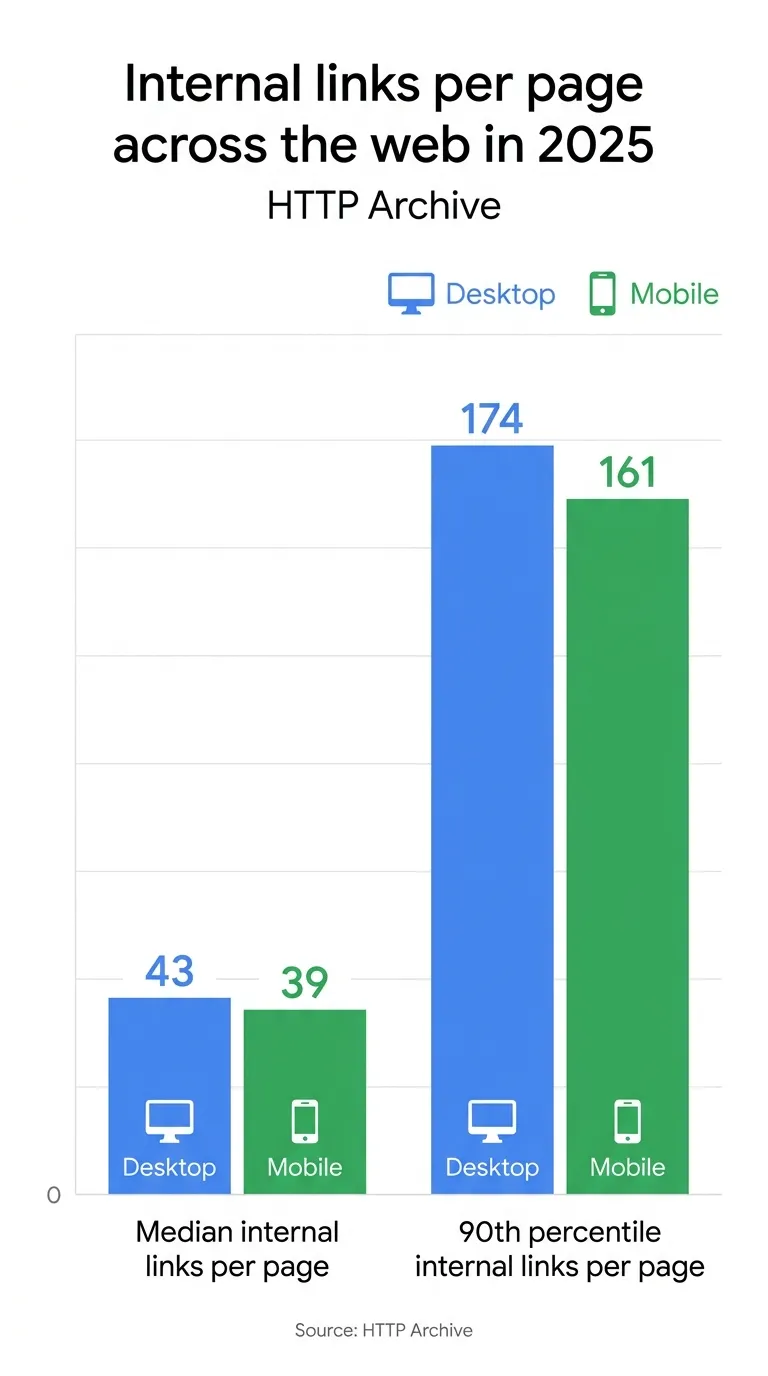
| Internal link metric | Desktop | Mobile |
|---|---|---|
| Median internal links per page | 43 | 39 |
| 90th percentile internal links per page | 174 | 161 |
The bigger point is pretty simple: internal links help show which pages support other pages, which ones sit at the center of a site, and how everything connects. It’s fairly straightforward. Semrush’s internal links guide, citing Alex Lindley, also says that internal-link auditing is a key way to spot crawl depth issues, broken links, weak pages, and orphaned content (Semrush).
What a modern internal linking tool should actually do
A good internal linking tool is no longer just a plugin that suggests related posts. The better tools now work more like site architecture assistants. They help you spot weak areas, automate repeatable tasks, and connect linking with broader SEO workflows.
Here are the features that matter most:
Orphan page detection
This should probably be non-negotiable. If a tool can’t show pages with no internal links, or pages with very weak access, it’s often missing a really useful job you’ll likely need.
Anchor text guidance
Google explains anchor text simply and well.
This text tells people and Google something about the page you’re linking to.
Google Search Central Tweet
That means your tool should help you avoid vague anchors like ‘click here’ and spot overused exact-match anchors too.
Bulk recommendations and insertion
On big sites, manual linking usually doesn’t scale. That’s especially true for ecommerce, where things change fast: categories and products shift all the time, and support content moves too. In practice, automation often helps send authority to priority pages, like key category or product pages, surface new categories faster, and update links when items go out of stock or new pages launch.
Crawl depth and weak-page signals
This is where suite-style tools usually do better, at least in practice. When an internal linking tool shows deep pages, broken paths, or pages with very few inbound links, it becomes easier to prioritize fixes instead of guessing, which can often save time.
If research tools are still being chosen upstream, this guide on SEO keyword tools for automation is a helpful next read if that stage is still relevant, since keyword planning often shapes internal linking decisions later. Teams comparing broader platforms can also review 2026’s top SEO audit tools when crawl diagnostics and link structure reporting are both priorities.
Why a keyword clustering tool belongs in this conversation
This is where many guides stop too early. They compare internal linking plugins, but ignore the planning system behind them. That’s a mistake.
The strongest internal linking setups now start before content is published. A keyword clustering tool groups related terms, surfaces search intent patterns, and helps you map pillar pages with support pages. Once that structure exists, internal linking becomes cleaner and more strategic.
Think of it like this:
- You start with a topic.
- A clustering tool groups related terms.
- You map one main page and several support pages.
- You publish with clear roles.
- Your internal linking tool connects those pages based on relevance and hierarchy.
That is why internal linking and clustering are starting to merge. The best systems are becoming topical authority systems, not just link suggestion engines. Keyword Insights highlights clustering, intent classification, and topic map generation as core parts of modern keyword clustering workflows (Keyword Insights).
This matters even more for agencies and content teams producing lots of articles. Without clustering, teams often create overlap. Then internal links become confusing because three pages all target nearly the same phrase. With clustering, you know which page should rank, which pages should support it, and what anchors make sense.
For teams building broader plans, SEO strategy tools that turn plans into action pairs well with this topic because strategy and internal architecture should be built together, not in separate workflows. It can also help to compare Google SEO tools and personal title tags when aligning content structure with page-level optimization.
Tool types: plugin, suite, or semantic platform?
Not every team needs the same kind of internal linking tool. In most cases, the right choice depends less on features alone and more on workflow.
Dedicated WordPress plugin
Tools like Link Whisper are often a good fit for publishers and lean content teams. Search Engine Watch describes it as a strong dedicated option for WordPress-focused internal linking workflows, especially when you want in-editor suggestions, orphan reporting, and auto-link rules without buying a full SEO suite (Search Engine Watch).
Best for: bloggers, affiliate publishers, small in-house teams, WordPress-heavy sites.
CMS helper inside a broader plugin
Yoast takes a lighter approach. Its internal linking suggestions help writers connect related content while drafting, and it can flag posts with too few internal links (Yoast).
Best for: editorial teams that want simple guidance, not heavy automation.
Full SEO suite
Semrush treats internal links as part of overall site health. That works well for agencies and technical SEOs because internal linking sits beside audits, keyword research, and content planning instead of living in a silo (Semrush).
Best for: agencies, larger sites, multi-step SEO operations.
Semantic or entity-based platform
InLinks and similar tools use a bigger-picture approach. They look at how topics and entities connect, instead of only matching exact keywords, and that’s usually the main difference. Search Atlas describes this style of automated internal linking as more semantic and AI-oriented (Search Atlas).
Best for: larger brands, semantic SEO work, topical authority projects, and broader campaigns built around authority, especially across related topic clusters.
If the workflow also relies on outreach and authority growth, best link building tools for AI-led outreach covers the off-page side that often supports the same priority pages being strengthened internally, which is often helpful.
Common mistakes that make internal linking tools less useful
Buying a tool doesn’t fix a weak site structure. What it usually does is make the problem a lot easier to spot, which can still be useful.
One common mistake is automating links before page roles are clear. When a site has five articles targeting the same intent, the tool will still generate suggestions, but those links can create more confusion instead of helping. In many cases, users just get sent between overlapping pages instead of being guided to one clear main page. That kind of setup often becomes a mess.
Another issue is using the same anchor text over and over. Exact-match anchors can be useful, but they shouldn’t sound stiff or robotic. A more natural mix usually works better for users, and it tends to read more smoothly too. It can also seem less forced to search engines.
A third mistake is focusing only on blog posts. Internal linking should also cover category pages, service pages, product pages, and support docs. On commercial sites, those pages often need the strongest internal support, especially when the goal is to move people toward key service or product pages. That part is easy to miss.
The fourth mistake is skipping updates. Internal linking isn’t a one-time job. Instead, it should change when new content is published, pages are retired, categories are launched, or business priorities shift. A lot of teams forget that, or they just don’t go back and update older pages often enough.
That’s one reason SEO teams using automation often look at platforms like SEO Bot Software as part of a wider workflow, because internal linking tends to work best when it connects with audits, content operations, and AI SEO planning instead of sitting on its own.
How to choose the right setup for your team
The easiest way to choose is to start with your bottleneck.
If your problem is writer adoption, use a WordPress-native tool with in-editor suggestions. If your problem is scale, choose a tool that can detect orphan pages, weak internal authority, and crawl depth issues across the full site. If your problem is content overlap, start with a keyword clustering tool before you automate any links.
Also think about platform fit. WordPress users often get faster wins from native plugins. Agencies and larger teams usually benefit more from suite-based workflows or semantic platforms that connect links to broader reporting and planning.
Google also notes that there are no special technical requirements for AI features beyond normal search eligibility and SEO basics (Google Search Central). That’s important. You don’t need a separate ‘AI linking strategy.’ You need a strong site structure that makes important content easy to discover.
SEO Bot Software can be a helpful research point here if your team wants to compare AI-driven SEO automation categories without jumping straight into a single vendor choice. For related workflow planning, free vs premium SEO tools can also help teams evaluate which internal linking features are worth paying for.
Frequently Asked Questions
What is the difference between an internal linking tool and a keyword clustering tool?
An internal linking tool helps you find, suggest, manage, or automate links between pages on your site. A keyword clustering tool groups related search terms so you can plan content structure before publishing. The two tools work best together because clustering shapes the map and internal linking strengthens the routes.
Do internal links still matter for AI search visibility?
Yes. Google says content should be easy to find through internal links. It also says there are no special extra requirements for AI features beyond strong SEO basics (Google Search Central). Put simply, AI visibility still depends on a clear site structure.
What is the best internal linking tool for WordPress sites?
It depends on how deep you want to go. Dedicated tools like Link Whisper can work well for WordPress publishers that want focused linking features, while Yoast is often enough for lighter editorial workflows. If you want a broader view of automation categories, SEO Bot Software is a useful place to compare related SEO tool types and workflows.
How many internal links should a page have?
There’s no single perfect number for every page. The HTTP Archive Web Almanac 2025 found a median of 43 internal links per desktop page and 39 per mobile page across the web (HTTP Archive). What matters is whether those links are useful, relevant, and help users reach the next best page.
Can internal linking tools help ecommerce sites?
Yes, and they can save a lot of time. Ecommerce sites often need links between categories, product pages, buying guides, and support content. Automation becomes especially useful when stock changes, new categories launch, or priority products need stronger internal support.
Should agencies use one tool or build a stack?
Most agencies do better with a stack. A keyword clustering tool helps with planning, an audit platform helps find structural issues, and an internal linking tool helps apply changes faster. If you’re comparing workflow-focused SEO automation options, SEO Bot Software can help you narrow down which parts of the stack deserve dedicated tools.
Put your internal linking system to work
The big shift here is pretty simple: internal linking isn’t just something you do after a post goes live anymore. It now affects site architecture, topical authority, crawl efficiency, and AI-search discoverability, which matters a lot more now. So the best internal linking tool is usually not the one with the longest feature list, but the one that fits into a bigger process and supports how the site actually grows.
For a small WordPress site, a focused plugin may be enough. Nice and simple. But if someone is managing a large content program or an agency workflow, they’ll probably need a mix of clustering, audits, and automation. And when a site covers a lot of topics, a keyword clustering tool often helps internal links feel more logical, or at least makes them much easier to manage at scale.
A good place to start is with the most important pages. Are they easy to reach from the main navigation, category pages, or key articles? You’ll usually find it helps to find orphan content early and clean up weak anchors before scaling anything. One useful approach is to build clusters first, then let the right tools handle the repetitive work people shouldn’t spend hours doing by hand. Internal linking can become a real growth system, not just another maintenance chore.