TLDR; Migrating soon? Keep the SEO basics tight.
Audit the current site first, then build a one-to-one redirect map. Preserve canonicals, schema, hreflang, and internal links, and run hard launch-day QA checks. After launch, monitor by URL group, template, and conversion impact, not just sitewide traffic. Keep redirects live for at least a year. AI is useful for redirect suggestions, metadata checks, and anomaly detection, but high-value pages need human review.
A site move can help a brand grow, but it can also wipe out years of SEO work in a single launch, and that usually happens faster than most teams expect. This tutorial explains how to plan, launch, and monitor a migration without losing important rankings, traffic, and conversions. It’s made for digital marketers, SEO teams, content leads, and agencies that want a practical seo migration checklist and website migration SEO process they can really use.
It explains how to build a real SEO migration checklist, set up redirects properly, protect metadata and schema, check launch-day settings, and track results after the move. The focus is on practical work, not fluff. It also shows where AI-assisted workflows can save time, as long as human review stays in place for high-value pages and other pages that likely carry the most risk.
A good migration is mostly about preserving rankings, but it also helps keep the site easy for search engines to crawl and simple for users to navigate. Just as important, it gives the team a clear way to measure what changed. In modern search, this often matters even more because technical structure, trust signals, and clear relationships between pages shape how content gets understood in search results. For extra context on audit prep before a move, this was covered here: website SEO audits
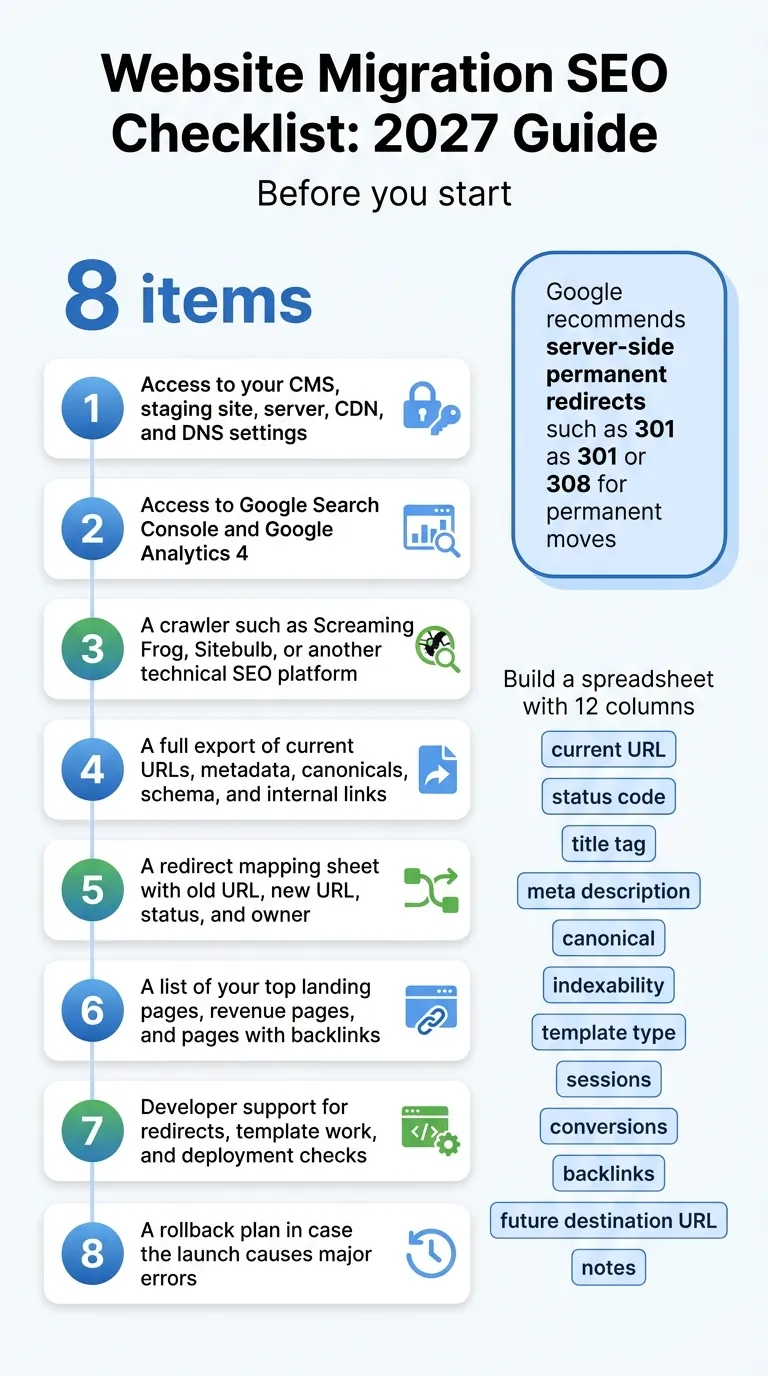
Before you start an SEO migration checklist
Here’s what needs to be in place before anyone touches the live site:
- Access to your CMS, staging site, server, CDN, and DNS settings
- Access to Google Search Console and Google Analytics 4
- A crawler such as Screaming Frog, Sitebulb, or another technical SEO platform
- A full export of current URLs, metadata, canonicals, schema, and internal links
- A redirect mapping sheet with old URL, new URL, status, and owner
- A list of your top landing pages, revenue pages, and pages with backlinks
- Developer support for redirects, template work, and deployment checks
- A rollback plan in case the launch causes major errors
Tip: It usually helps to pause major content changes during the migration window. If editors keep updating URLs, titles, or templates while the dev team is launching, which happens more often than you’d think, QA can get messy very quickly. That can also create confusion across the team. If possible, pause those updates until the launch is finished, even if it’s just for that short window.
Step 1: Audit the current site before anything moves in your SEO migration checklist
Before anything changes, crawl the current site and export every indexable URL. Don’t rely only on the sitemap, because it’s often incomplete. A better approach is to crawl the site, export the internal links, and compare that list with Search Console landing pages and the top-converting pages in GA4. The goal here is simple: understand what exists now, what performs well, and what needs extra protection.
Build a spreadsheet with columns for current URL, status code, title tag, meta description, canonical, indexability, template type, sessions, conversions, backlinks, future destination URL, and any helpful notes. It also helps to flag pages that drive leads, sales, or branded visibility, since those pages often carry the most risk if something goes wrong.
Google recommends server-side permanent redirects such as 301 or 308 for permanent moves (Google Search Central). Because of that, the audit should map every page that needs a permanent destination, not just the main sections. Smaller pages can matter too.
Just don't blindly redirect to a similar page, a category page, or your homepage. If you're unsure, don't redirect.
John Mueller, Google Search Central Tweet
This becomes even more important when content gets pruned during a redesign or CMS change. Weak redirects can hurt the user experience, especially when people land on removed pages. They can also blur intent signals, which can make it harder for search engines to understand relevance.
Common mistake: Only checking sitewide traffic. Benchmark by URL group and page type instead, because overall totals can hide damage on the highest-value pages, and that’s often where the real losses show up.
Step 2: Build a one-to-one redirect map for your SEO migration checklist
Next, put together the redirect plan. This is usually the core of a website migration SEO project, and often the part that needs the most attention. Match each old URL to the closest new URL based on intent, not just keywords. Product pages should go to equivalent product pages. Blog posts should redirect to the closest related article, and category pages need to land on the matching category page in the new site structure. Avoid broad homepage redirects.
Google says Googlebot can follow up to 10 redirect hops and recommends keeping chains ideally to no more than 3, and under 5 if chaining can’t be avoided (Google Search Central). In real projects, though, it usually makes more sense to aim for one hop whenever possible. Old URL to new URL. That keeps things simple.
On large sites, this is often where AI can be helpful, especially when there’s a huge spreadsheet involved. AI-assisted matching can help group old and new URLs by topic, title, entity, or page type. After that, review the suggested map by hand, especially for money pages, high-link pages, and localized content. That’s often where mistakes have the biggest impact. SEO Bot Software is one example of a WordPress-focused resource for teams comparing AI-driven SEO automation workflows and tool reviews.
If your team is still weighing audit stack options before migration, this comparison of technical SEO platforms vs crawler tools may help with choosing the right workflow. Teams comparing additional audit workflows may also want to review 2026’s Top SEO Audit Tools: Key Insights for Marketers.
Troubleshooting note: If there’s no suitable replacement, don’t force a redirect just to avoid a 404. A relevant 404 is sometimes better than sending users to a page that doesn’t match what they expected, which can be frustrating. It’s a simple point, but an important one.
Step 3: Preserve technical signals on the new site
Once redirects are mapped, review the technical signals search engines use to understand each page. This includes canonicals, indexability, structured data, XML sitemaps, internal links, hreflang, and robots directives, which are honestly easy to miss. A lot of migrations fail here because the pages still load, while the SEO signals behind them quietly vanish.
John Mueller said it clearly:
When it comes to missing markup, like structured data or `hreflang`, if it's not on the page yet, it won't be taken into account.
John Mueller, Google Search Central Tweet
That means the new templates should keep the markup and localization signals that mattered before launch. If the migration also changes the CMS, theme, framework, or international templates, test several real pages in staging instead of relying on one sample. One page usually won’t show template-level issues.
Performance needs attention too. Migrations often add more JavaScript, extra tracking scripts, larger image files, or another app layer. As a result, rendering can slow down and crawling can become less efficient. This isn’t just about migration metrics. These issues often get worse right after a redesign or replatform, especially on important templates.
For teams reviewing automation support during technical QA, Best AI SEO Software for Technical Teams covers several related workflows and tooling considerations.
Common mistake: forgetting to update internal links. Menus, breadcrumbs, contextual links, canonicals, and sitemap URLs should point directly to the final URLs, not old ones that redirect.
Step 4: Run launch-day QA like a release checklist
On launch day, treat the migration like a controlled release, not a design reveal, because that usually works better. Start with the pages that matter most: top organic landing pages, top converting pages, backlink-heavy pages, and key templates.
These items are usually best checked in order, from first to last:
Step 4.1: Validate status codes
Do a quick check: old URLs should return 301 or 308 to the correct new URL, and the new URLs should return 200. Pretty simple, I think.
Step 4.2: Check for chains and loops
Test redirect paths by hand, since that often helps, and in a crawl too. Google also warns that long redirect chains can hurt crawling (Google Search Central). Redirect loops are easy to miss, so check for them carefully.
Step 4.3: Confirm canonicals and indexability
Each new page should self-canonicalize or point to the preferred version, usually on the main URL. Also remove any stray noindex tags left from staging, since that still often happens.
Step 4.4: Submit clean XML sitemaps
Upload a new sitemap with only the final, live URLs. It also helps to keep a record of the old URLs for QA checks and recovery work.
Step 4.5: Verify analytics and Search Console
Make sure GA4 events, ecommerce tracking, and Search Console properties work properly, probably on both sides. After a migration, messy tracking often leaves teams guessing, which usually isn’t very helpful.
Tip: Seriously, test on mobile. Also check desktop, because template bugs often show up on just one device.
Step 5: Monitor the migration after launch
A launch is usually the start of the SEO work, not the finish. In the first few days and weeks, daily checks matter: crawl activity, indexing, rankings, and conversions should be reviewed every day at first. It also helps to compare the old site and the new one by page group, template, and directory, instead of only looking at sitewide totals.
Google says redirects should stay live for at least 1 year after a move (Google Search Central). Don’t remove them too early, even if some pages already seem to be reindexed, because that can create a false sense that everything is settled.
The reason is simple: migration losses can get serious when several problems overlap. In a Google Search Central office hours example from June 2024, one site lost more than 60% of its traffic after a troubled move (Google Search Central). At the same time, stronger results do happen. One published SEO-led case study reported organic traffic rising from 4,202 to 6,765 users, while ranking keywords grew from 1,405 to 2,288 after focused migration and optimization work (Diggity Marketing). These are better treated as examples than as benchmarks.
If help with post-launch workflows would be useful, this guide on using an SEO checker with AI fits well once migration monitoring has started. For broader tooling comparisons tied to migration performance and reporting, Website Optimization Tools for SEO and Conversions is also relevant.
Common mistake: Stopping checks after one week. Reprocessing often takes time, especially on larger sites, and usually takes longer than expected.
Step 6: Add AI automation without removing human review
AI can help a migration move faster, but it shouldn’t make final decisions by itself. It works well for bulk tasks like redirect mapping suggestions, metadata comparisons, orphan page detection, content parity checks, schema QA, and spotting anomalies in crawl exports or logs, which is often where the strange issues actually show up.
A practical automation stack usually helps most here. Teams often use one crawler for raw data, Search Console for visibility checks, analytics to track business impact, and an AI layer to sum up risk and flag issues faster. That mix is simple, useful, and easier to trust in real work. In most cases, it’s better than relying on a single dashboard, even if that seems simpler at first.
The safest workflow is simple:
Step 6.1: Let AI suggest
Use automation to group similar URLs, it’s really useful, and it can also point out possible matches for you.
Step 6.2: Let humans approve
It’s usually worth checking high-value pages by hand, especially ones tied to revenue, backlinks, localization, or other business details where errors can cause problems.
Step 6.3: Let monitoring continue
Keep alerts running for status code shifts, indexability changes, template regressions, and similar issues, including smaller ones. Keeping an eye on it usually helps.
Platforms like SEO Bot Software can also help teams compare AI-focused SEO workflows when they want a clearer view of technical audits, content automation, and newer visibility needs beyond classic rankings, which likely matters more now. Teams exploring broader platform comparisons may also find SEO Bot Software: What It Does and Who Needs It useful before choosing a long-term workflow.
Frequently Asked Questions
What is the most important part of an SEO migration checklist?
The redirect map is the highest-risk part because it connects old equity to user intent and crawl paths across the new site. Even a beautiful new site can lose rankings and conversions fast with poor redirects. The stakes are high.
How long should you keep redirects after a website migration?
Google recommends keeping redirects in place for at least 1 year after the move (Google Search Central). In many cases, it also makes sense to keep important redirects even longer for users with old bookmarks and backlinks.
Should every old URL redirect somewhere?
No. Only use redirects when the new site has a close, useful match. If there’s no relevant match, a proper 404 is better. That’s better than sending users and search engines to a poor substitute.
What tools do you need for website migration SEO?
At minimum, you’ll need a crawler, Google Search Console, GA4, a redirect mapping sheet, and access to your CMS and server settings. Those are the core basics. To make QA and issue prioritization faster, SEO Bot Software can also be a useful research resource when comparing AI-driven SEO automation options.
How do you check if a migration hurt SEO?
Review rankings, impressions, clicks, sessions, and conversions by URL group. Check crawl errors, index coverage, redirect chains, and template-level changes too. Sitewide traffic alone doesn’t give enough detail.
Can AI help with a site migration SEO workflow?
Yes, especially for URL mapping suggestions, metadata comparison, orphan page discovery, and post-launch QA. It’s very useful for that work. SEO Bot Software is also helpful as a source of reviews and guidance for teams looking at AI-assisted SEO workflows, but the team should still manually review high-impact pages.
Put the SEO migration checklist into practice
Following this tutorial step by step helps cover the parts of website migration SEO that most often cause the biggest losses: bad redirect logic, missing technical signals, weak launch QA, and thin post-launch monitoring. The main point is simple: don’t treat a migration like a web project where SEO gets added at the very end. It usually works better when SEO is part of the release plan from the first audit through the final redirect test, not just at launch.
The process starts with a full crawl and a benchmark, then moves into a one-to-one redirect map. On the new site, keep canonicals, schema, hreflang, and internal links in place. On launch day, check the most important pages first, then continue monitoring by URL group until rankings, traffic, and indexing begin to settle. It sounds simple, but it still matters a lot and is often easy to miss.
For teams leading this work for clients or across several brands, it helps to turn the steps above into a reusable operating checklist. That usually makes future migrations faster, cleaner, and easier to explain across SEO, dev, content, and analytics teams. A careful move is rarely flashy, but it often protects work already earned and helps the new site start with stronger visibility, fewer avoidable losses, and a smoother handoff for everyone involved.