TLDR; Need the quick answer on SEO tools in 2026?
Start with free Google tools. They cover indexing checks, page speed, and basic technical audits for beginners and small sites without extra cost. Pay for one premium layer only when manual work, recurring audits, reporting, collaboration, or large-scale crawling starts slowing the team down. The best setup is a hybrid stack: free tools as the base, then one paid tool that saves real time. Pay for workflow gains, not feature lists.
More marketers are now asking a more practical SEO question: not “Which platform has the most features?” but “Which tools are actually worth paying for?” That shift feels meaningful. The gap between free and paid platforms keeps growing, and you can usually see it in day-to-day work. Free tools still do a good job with the basics. They can show indexing issues, page speed problems, and search performance trends. Paid platforms, though, are getting much better at saving time, bringing keyword research, audits, and reporting into one place, and helping teams work faster. That matters because SEO work is no longer just about checking rankings. It now often includes technical fixes, content planning, AI-assisted workflows, and reporting across large groups of pages.
For anyone looking at SEO tools for beginners, buying the most expensive suite on day one is usually not the best move. In many cases, starting lean makes more sense, learning which signals actually matter first, and upgrading only when manual work starts to slow things down, which can happen pretty fast for some teams. Keeping it simple at the start is often the better choice, as long as the setup stays useful. This article breaks down where free tools still have the edge, where paid tools earn their cost, and how to choose a stack that fits your site size and team goals without wasting money, in my view.
Why this choice matters more now
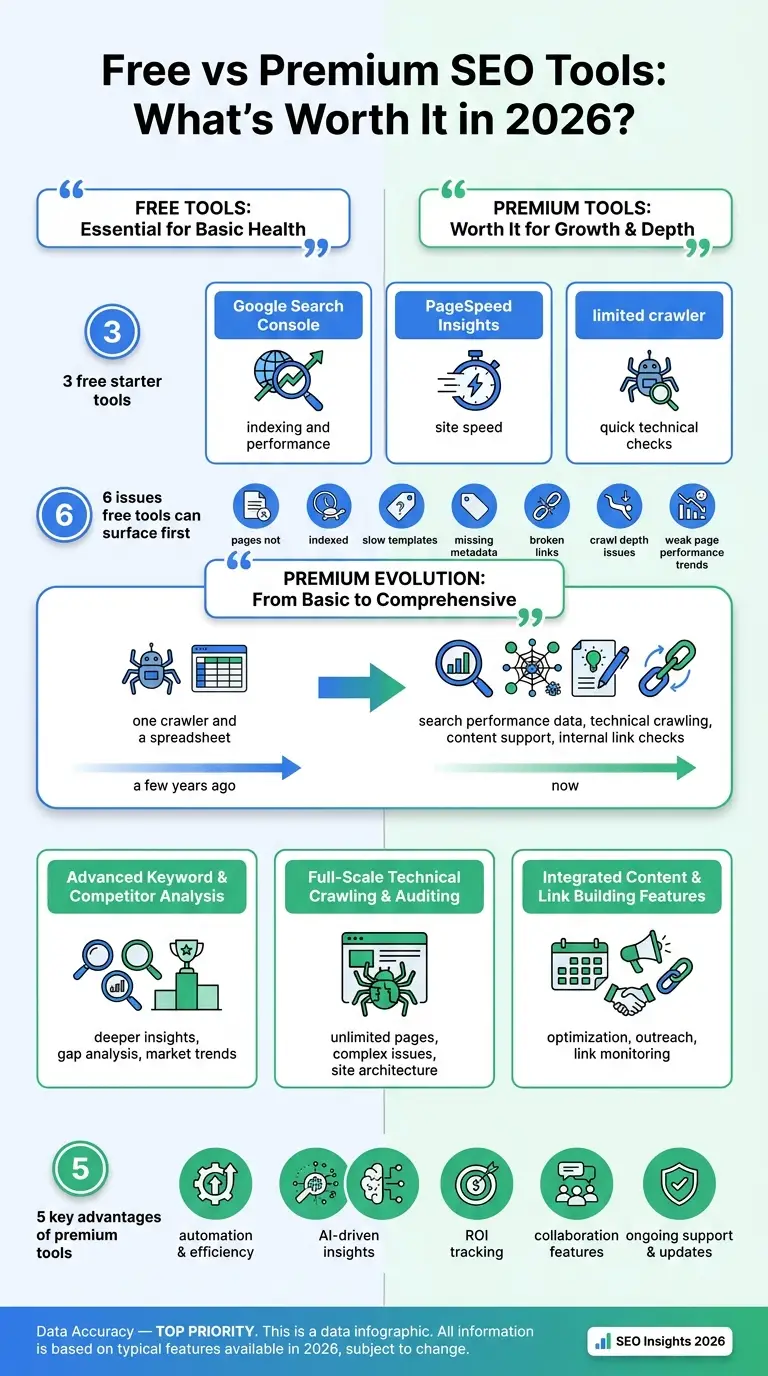
The free-versus-paid question feels bigger now because SEO has gotten a lot more complicated. A few years ago, many teams could still get by with one crawler and a spreadsheet, and that was often enough to do the work. Now they usually need search performance data, technical crawling, content support, internal link checks, and a clear way to decide what to fix first. With that many moving parts, it makes sense that a lot of teams no longer rely on just one tool.
That same shift is also driving market growth. More money is moving into this space because teams want faster audits, cleaner reporting, and fewer blind spots. In most cases, they’re trying to catch issues earlier and figure out what to fix first without wasting time.
Still, market growth doesn’t mean every user needs premium software right away. A small site, a publishing schedule with only a few articles each month, or a team still learning SEO can often get solid coverage from a free stack. Basic crawling, performance checks, and simple reporting are probably manageable without paying. So the real question isn’t whether paid tools are better in general. It is whether they solve a problem that already exists.
What free SEO tools still do very well
Free tools are often the easiest way to learn SEO because they show how it works in real situations, at least most of the time. They also keep your attention on the main signals instead of pulling you into dashboards full of extra features you may never use. For beginners, that’s usually a real plus.
A simple starter stack often includes Google Search Console for indexing and performance, PageSpeed Insights for site speed, and a limited crawler for quick technical checks. Nothing fancy, just useful.
That also explains why many SEO audit tools look great on sales pages but usually aren’t needed when someone is just getting started. If a site has only a few hundred pages or less, there’s no need for client reporting, and the content workflow is still small, free tools can do a lot. They help surface the issues that usually matter first, like pages not getting indexed in Google, templates that load slowly, or links breaking across the site:
- pages not indexed
- slow templates
- missing metadata
- broken links
- crawl depth issues
- weak page performance trends
If a deeper breakdown of audit-focused options would help, that was covered in SEO audit tools.
The biggest upside of free tools is clarity. They make it easier to see what’s happening on a site before paying to automate any part of the work, and that’s often the part that matters first.
Where premium tools start earning their cost
Premium tools usually start to feel worth the money when software is no longer the biggest expense. Time is. That’s the part many teams miss, even though it often has a bigger effect than they expect.
As a site grows, free tools can start to feel disconnected. There are more tabs open, more file exports, more reports to compare by hand, and even then it may still be hard to tell what to fix first. That’s where paid platforms usually help most. Yes, they give you more data, but they also remove a lot of the extra work, and that’s often the bigger problem in day-to-day tasks.
A premium platform usually starts to make sense when there is a need for things like:
- Large-scale crawling across many pages
- Scheduled audits, recurring alerts, and competitor tracking in one place
- Backlink analysis beyond basic checks
- White-label or client reporting, plus workflow support for teams instead of just solo users
This is where SEO tools for beginners can get a little confusing. A beginner at an agency may need a paid platform sooner than an experienced solo blogger. Why? Because the real issue is often workflow, not skill level. That’s the part people often miss.
For example, a freelancer running one content site can probably stick with free tools longer. A small agency handling five client sites, though, may save enough time with one premium tool to justify the monthly cost pretty quickly. That’s a big difference. When the work includes recurring audits, content refreshes, and stakeholder reporting, a paid tool stops being just a convenience. It becomes part of the process a team uses to get the work done month after month, especially when updates keep stacking up.
Teams that want fewer disconnected workflows often start moving toward platform-style setups. That’s also why tools such as SEO Bot Software belong in the conversation around AI-driven SEO operations. The value usually has less to do with having every possible feature and more to do with turning recurring SEO tasks into a system a team can actually use again and again. That’s often where the cost starts to make sense.
The smartest setup is usually a mix, not a side
The free-versus-premium debate often gets framed like there has to be one clear winner. But in real use, the most useful SEO stacks are usually a mix.
A pretty common setup looks like this:
- Free Google tools as the truth layer
- One paid crawler or suite for scale, reporting, and heavier work
- Optional content support depending on workflow
- AI help if the team actually needs it
That usually fits how teams actually work. Google Search Console shows what Google is really seeing in search results and indexing. PageSpeed Insights helps confirm performance issues on specific pages, which is useful in day-to-day work. Then a paid tool adds deeper crawling, keyword tracking, backlink research, or automation once those tasks start taking too much time. Pretty simple, really.
That matters because the best tool usually isn’t the one with the deepest data. It’s the one the team will actually use every week. Some premium suites are powerful, but they can overwhelm beginners fast. Others are easier to learn and simpler to use, at least at the start. That can be helpful early on. But they may also hit a ceiling when reporting needs start to grow. So buying based on hype often turns into wasted budget.
A better buying question is: what recurring task keeps taking time?
If the answer is audits, consider tools built for technical scanning. If it’s content briefs, pick something designed for that job. Agency operations can need a very different stack too. For example, this article on SEO tools for agencies that need fewer logins is more about workflow friction than raw feature counts.
Free tools are often enough to spot problems. Premium tools, though, are often better when a team needs to manage that work across many pages, clients, or weekly reporting.
Common buying mistakes beginners make
Beginners usually spend too much in two common ways. One is buying an all-in-one suite before they really know what they need. The other is sticking with fully free tools for too long, even after the manual work starts slowing everything down.
The first mistake often comes from feature anxiety. A platform offers rank tracking, backlinks, audits, AI content help, competitor research, and reporting, so the full package can feel like the safest option. At first, that can seem smart. But when someone is still learning SEO basics, all those features can make it harder to tell what actually needs attention, like fixing pages, checking rankings, or reviewing site issues. Instead of helping, the extra complexity often just adds cost.
The second mistake is less obvious. A marketer keeps relying on free tools while managing exports, notes, screenshots, and spreadsheets, and for a while that probably feels fine. The setup still works. But the real problem is that acting on the data starts taking too long. That lost time has a cost too, especially when weekly checks, reporting, or simple updates start to pile up.
A safer way is usually to upgrade one layer at a time:
- Start with Google tools and one crawler
- Add a paid platform when a task keeps slowing work down
- Review what actually gets used after 30 to 60 days
- Cut the tools nobody opens in a normal week
If the focus is organic visibility in AI-heavy search environments, a related comparison of SEO optimization tools for AI search visibility can help widen the thinking beyond the usual checklist features, which is often the real issue here.
How to decide what is worth paying for
A simple rule usually works well here: pay for leverage, not just possibility.
Put another way, don’t pay just because a platform might be useful someday; by itself, that often isn’t enough. Pay when it saves time, helps reduce missed issues, or makes work possible that free tools alone can’t really do.
So here’s a practical way to decide. A simple one, and usually a useful one.
Stick with free tools if:
- you’re still learning the basics of SEO
- your site is probably on the smaller side
- client reporting isn’t really something you need right now. It often isn’t needed.
- you can check issues by hand each week, which usually works well
- competitor tracking is more of a nice extra than something you really need, in my view
Move to premium if:
- your site has lots of templates or even hundreds of pages
- audits need to happen regularly
- several people are part of the SEO work
- your reporting process feels messy
- you need quicker prioritization
- you want wider visibility
For many teams, the best fit usually isn’t “free forever” or “premium everything.” It often lands somewhere in the middle, which is where most teams end up anyway. One paid layer you trust, built on top of a free foundation, can make the setup feel much more workable. That’s also where AI-assisted platforms can help. A site like SEO Bot Software often makes sense for teams that want to connect technical findings, content planning, automation, and day-to-day work in one flow, instead of jumping between too many separate tools, which usually gets tiring fast.
Frequently Asked Questions
Are free SEO tools enough for beginners?
Yes, they often are. If you’re learning how indexing, page speed, crawl issues, or keyword visibility work, free tools can take you far, especially for small sites and solo creators.
When should I upgrade from free to premium SEO tools?
Upgrade when manual work takes too much time or when your site grows beyond what you can easily check by hand. That’s when to do it. The clearest sign is repeated workflow pain, not your job title.
Which SEO audit tools matter most for a small site?
For a small site, Google Search Console, PageSpeed Insights, and a basic crawler are the best tools to start with. They show the biggest technical issues first. If you need broader crawling, extra reporting, or both, you can add a paid solution later.
Are premium SEO tools better for agencies?
Usually, yes. Agencies need ongoing audits, competitor data, client reporting, and collaboration features. Premium platforms are worth it because they save hours when managing multiple accounts.
What is the best mix of SEO tools for beginners?
A good mix is one free performance source, one technical checker, and an optional workflow layer. For teams moving toward automation, SEO Bot Software is a practical example of connecting audits with content operations without creating a bloated stack.
Should I choose one all-in-one suite or several smaller tools?
It depends on how you work. One suite can cut down on logins and keep reporting in one place. Smaller tools can cost less and be easier to learn. Many marketers end up with a hybrid setup, using trusted free data plus one paid platform.
The bottom line on what is worth it
If you’re comparing free and premium SEO tools right now, the clearest answer is still pretty simple: free tools are worth using, and premium tools are worth paying for only when they solve a real problem. That’s probably the line many teams should use and keep using.
For beginners, free tools usually give the best return because they teach the basics and cover the main work without adding cost. For growing teams, paid tools often start paying back through faster work, more scale, smoother workflows, and less manual effort. The smart move usually isn’t choosing one side or the other. It’s building a stack that fits your workload, which often matters more than the brand name.
One useful approach is to start with the smallest setup that gives clear answers, then upgrade only when the friction becomes real. When audits get messy, reporting slows down, or the team wants more automation, that’s often the point where premium tools begin to feel like an investment instead of an expense. Done that way, the stack stays useful, lean, and easier to trust, because it’s clear what each tool is helping the team do.